


This page contains various working examples of real user issues which have been addressed and given here to demonstrate the results.
Sewing Patterns – for Lisa
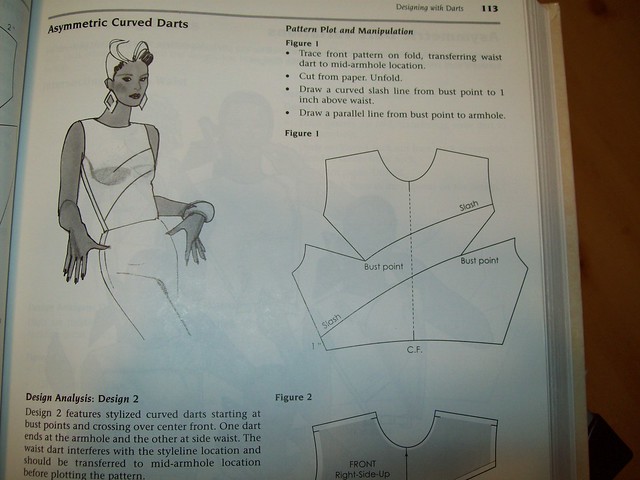
Asymmetric Pattern Demo-12
Sewing Pattern Demo
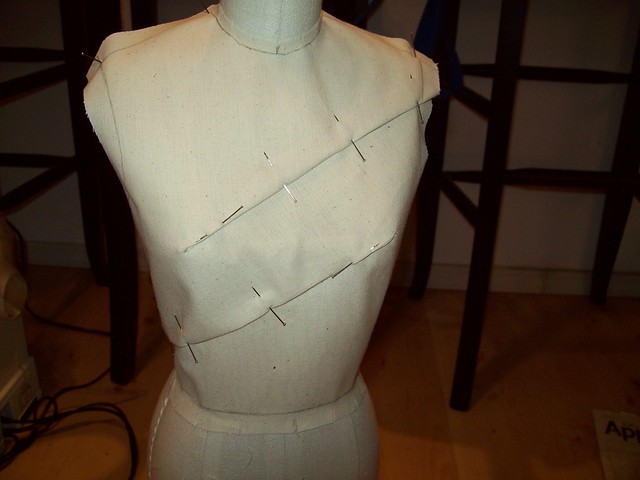
Asymmetric Pattern Demo-11
Sewing Pattern Demo

Asymmetric Pattern Demo-10
Sewing Pattern Demo

Asymmetric Pattern Demo-9
Sewing Pattern Demo
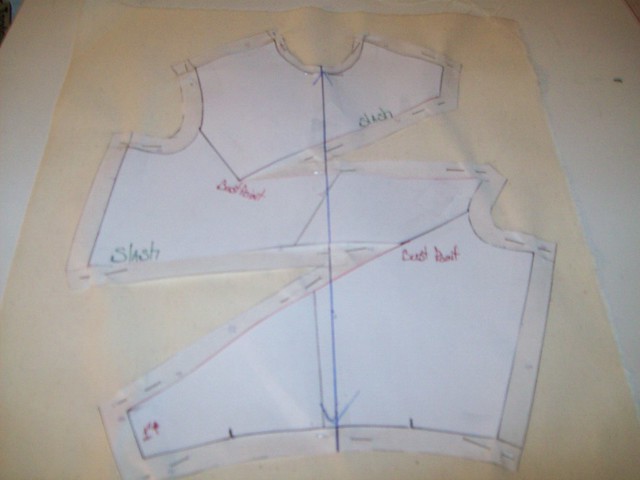
Asymmetric Pattern Demo-8
Sewing Pattern Demo

Asymmetric Pattern Demo-7
Sewing Pattern Demo

Asymmetric Pattern Demo-6
Sewing Pattern Demo

Asymmetric Pattern Demo-5
Sewing Pattern Demo

Asymmetric Pattern Demo-4
Sewing Pattern Demo

Asymmetric Pattern Demo-3
Sewing Pattern Demo

Asymmetric Pattern Demo-2
Sewing Pattern Demo

Asymmetric Pattern Demo-1
Sewing Pattern Demo

Asymmertic Pattern Demo-0
Sewing Pattern Demo

One Dart Sloper Demo-8
Sewing Pattern Demo

One Dart Sloper Demo-7
Sewing Pattern Demo

One Dart Sloper Demo-6
Sewing Pattern Demo

One Dart Sloper Demo-5
Sewing Pattern Demo

Half Scale Basic Sloper-5
Sewing Pattern Demo
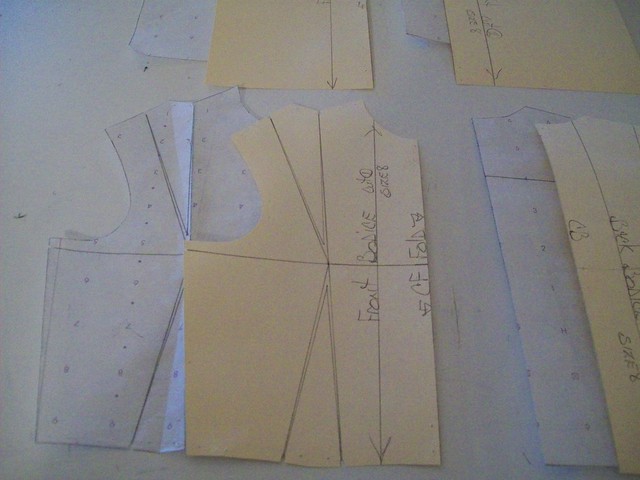
Half Scale Basic Sloper-4
Sewing Pattern Demo

Half Scale Basic Sloper-3
Sewing Pattern Demo
Punkin Pie – for Keesha







Flickr Flora – for Sha
No photos available right now.
Please verify your settings, clear your RSS cache on the Slickr Flickr Admin page and check your Flickr feed
Flickr Slideshow – for Ian

My Express Site Revolution

My Express Site Revolution

My Express Site Revolution

My Express Site Revolution

My Express Site Revolution

My Express Site Revolution

My Express Site Revolution

My Express Site Revolution

My Express Site Revolution

My Express Site Revolution

My Express Site Revolution

My Express Site Revolution

My Express Site Revolution

My Express Site Revolution

My Express Site Revolution

My Express Site Revolution

My Express Site Revolution

My Express Site Revolution

My Express Site Revolution



















Hi Jan, I am not sure what you mean by “add to gallery” – this is not a Slickr Flickr feature – maybe some other plugin?
I am having a bit of a problem trying to get 7 images to appear on my friends site. I changed the privacy settings, but cannot get the “add to gallery” to show. Will it work without them being in a gallery? It is in a set now. Would appreciate any assistance…thanks….. YourBottomLines.com
Russell,
Sir, I’ve used a number of plugins and purchased a number of premium themes. I’ve never seen anyone that is so helpful to people using their FREE product.
Thanks a lot.
Adam.
Hi Adam,
I am glad it is working now.
Your WordPress theme, Authority Pro, is not following the WordPress ‘standard’ of activating the WordPress hook ‘wp_footer’. WordPress outputs any enqueued scripts at this hook. The Slickr Flickr scripts were queued for loading but did not get loaded because the hook was never activated by the theme. This ‘issue’ may effect other plugins that load scripts in the footer so it is something to watch for.
Cheers
Russell
Russell,
Thanks for the awesome, timely reply.
Actually, I am using Safari. I checked it out in IE. I didn’t see any errors.
However, I had the “Load JavaScript In Footer” checked. I unchecked it and it works great. I’m assuming it’s because the theme I’m using, Authority Pro, sets up the footers and has it wigitized…so there are some writing conflicts to the footer? Again, I’m not a coder/programmer but unchecking it worked.
Thanks again.
Hi Adam, first thing is to check your page for javascript errors (Inspect Element on Firefox and Chrome, and the status bar at the foot of the page on Internet Explorer).
Also try going into Slickr Flickr Admin settings and setting the “load scripts in footer” option (this can sometimes fix plugin conflicts as things get loaded in a different order)
Hi guys,
I setup the standard plugin last night and got it to link to my Flickr account fine. I am trying to setup a slideshow in the sidebar but for the life of me I can’t get the slide show to work. It only loads one picture. It won’t change when clicked, it doesn’t transition on its own…
I know little about html or css. Any suggestions?
Thanks.
Adam.
Thank you very much Russel!
Hi Johnny,
This is probably down to your theme’s style.css overriding the plugin CSS which sets the size of the element that contains the slideshow – or if the theme is incorrectly customized it might not being be including any plugin’s javascripts and styles in the header.
The way to debug this to look at your site in Chrome and use the “Inspect Element” command to see what is controlling the size of the “div” that contains the slideshow. It should show a height of 400px for a medium size landscape slideshow
If you would like personal support then sign up to the Pro Edition and I can take a look at your site
Regards
Russell
As regards the slideshow dimensions, you can control them in the Standard Edition using a little HTML or CSS, or more easily in the Pro Edition by using the “height” and “width” parameters
Hi Santiago,
I will add “target” as a parameter in the next release in a couple of weeks
Regards
Russell
Hi,
When I enter the code [slickr-flickr tag="blackandwhite"] I get a galleria. When I try to specify type=”slideshow” it yields only picture names, but no images. I’m stumped.
Russell,
Thanks for your quick answer, great support for a great plugin!
I was asking you about this because I want to put a slideshow, BUT I need it to have a defined width and height, in particular I want it to have the landscape “proportion” (4:3 I guess) ALWAYS. The one I was trying exceeded that height because of the portrait photos, so I was unable to use on my sidebar.
The other question: lightbox=”none” worked fine, but what if I would like to open that link in a new window? Like target=”_blank”. Is any property for that?
Thanks a lot,
Hi Santiago
The “orientation” is NOT a filter that only shows photos of the specified orientation. That is not its purpose.
The orientation parameter is used to calculate the height of the slideshow (i.e the portrait slideshow is taller than the landscape slideshow). It will show all photos constrained within that height.
On the slideshow, galleria and gallery the photo caption is a link to Flickr if you specify: flickr_link=”on”
From version 1.24 onwards if you specify type=”gallery” and lightbox=”none” then you will have a direct link to the photo on Flickr from the thumbnail (instead of a lightbox)
Hello Russell,
Congratulations for an excelent plugin. It just took me 3 minutes to configure it.
BUT….I cannot get the orientation=landspace to work on. It keeps showing landscape and portrait together.
The code I’m using is [slickr-flickr items="20" type="slideshow" flickr_link="on" size="small" orientation="landscape"]
Also, what can I do if I want the links on the slideshow and the gallery to take to flickr? If I click on a single photo when it is showing on slideshow, take me to the link of that particular photo in flickr, and the same on gallery mode.
Thanks a lot, congratulations for a terrific plugin!
Thanks for the reply…i’ve changed the height in the slickr-flickr.css file and its working now!!!
Thanks for all your help 🙂
Apu
Hi Apu,
You get best results with the slideshow if all your photos are the same size.
Do you have a mix of portrait and landscape photos? If so, change the slideshow by specifying
[css]
orientation=portrait
[/css]
Make this change first and see the effect. Then, if CSS is required, please send the URL of the page with the slideshow, your Flickr ID and the tag you are using.
Regards
Russell
hi!!
This is a great plugin! but i’m facing one problem – the photos that are coming in the slideshow from flickr are of different sizes, at times the caption/title of the picture is hidden behind the picture itself. I’m quite a novice regarding css. So it will be very kind of you if you could give me some idea how to solve this problem…
Thanks in advance
Apu
Thanks so much Liz, your solution worked great!!!
Thanks for the response.
Yes, I have customized the theme quite a bit. Following your train of thought, I found that I had deleted the tag, and that messed up a lot of things. It is fixed now. Thanks for the help.
HI Dave,
I have checked the source of your page and no javascripts are being installed and that is why Slickr Flickr is not working.
Did you change the WordPress Theme at some point?
Regards
Russell
Russell,
I installed the plugin on Friday, and it worked beautifully. I have three photos that were in slideshow that looped continuously. Something changed over the weekend, and now the three photos just show up in a list on my page. I’m guessing that the CSS or the script that runs the slideshow has been stripped off somehow, but I have no idea how.
I have tried deactivating, uninstalling and reinstalling the plugin, but I keep getting the same results. Any suggestions?
Dave
Hi Doug. Russell (the plugin developer) isn’t here at the moment, (I’m his wife) – I’ll try to help. I had the same issue you describe myself on a blog when I used Slickr Flickr for the first time, a couple of days ago. The reason is because currently, Russell is leaving enough space under the slideshow to allow for the description of a photo to be displayed. I didn’t like the gap either so I did some CSS to fix my layout.
If you view the slideshow on this page you’ll see that the gap is gone.
http://www.hotellaurena.com/carriacou-hotel-laurena-ready-to-host-cricket-team-for-historic-game-1319
One thing in my opinion – if you want a Slickr Flickr slideshow to look really good – you have to take the time to make each of the photos in the slideshow the same size. If you do that (as I did in the example above), you can add CSS like this :
.custom div#post-1285 .slickr-flickr-slideshow.landscape.medium {height:410px; text-align:center;}

.custom div#post-1319 .slickr-flickr-slideshow.landscape.medium {height:360px; text-align:center;}
Each of those applies to a particular slideshow on a certain page. All you have to do is figure out the page id, and the height of your images . (They do all have to be the same).
Liz
Hi,
I am trying to use the plugin on the homepage of a site I am building for a foundation and notice that when I use the “medium” size for the slideshow, there is a significant amount of white space that appears below the slideshow before my text begins. This is not the case when I test it using the “small” size
Is there any way to adjust the CSS or find the right CSS file and parameter to adjust this so to reduce the added space below the slideshow
Unfortunately, I cannot provide a URL right now as I am developing the site offline
Any help is appreciated.. thx!
-Doug
Steve, what size parameter are you using for Slickr Flickr?
Have you tried size=”large” or size=”original”?
It’s not slickr-flickr related per se, but i can not, for the life of me, figure out how to make the larger image bigger. I know it’s something somewhere within the lightbox settings, but i can’t find it at all. Can you give me a hint?
I’m using “Lightbox with manual slideshow”
Hi Joel,
I am still not seeing your photos on Flickr – are they marked as private maybe?
Russell,
Thanks for your timely response.
My tags are now available with Flickr, but I’m still getting the same error. I have reset the cache and all that stuff.
Could have something to do with how my Flickr account is set up?
Thanks again.
Hi Joel,
When I visit your Flckr account right now there are no photos at: http://www.flickr.com/photos/joelschlotterer/tags/painting/
Flickr has a farm of servers so it looks like your changes are not yet publically available on all servers.
If you wait a little while they will appear without you having to do anything. Once there are available on Flickr then refresh the WordPress RSS cache on Slickr Flickr Admin settings
Regards
Russell
When I place my slickr flickr slideshow all I get is a “no photos for painting” reply. “painting” is the tag I used in flickr to organize my slideshow, I have checked my user ID, api key and I’ve reset the cache. my tag looks like this: [slickr-flickr tag="painting" delay="5" type="galleria"]. I have even taken the images out of sets on Flickr so they are only associated with the tags. Any Ideas why it thinks there are “no photos for painting”?
I have used this on a previous site and had no problems. There must be something I’m missing.
my Flickr account is http://www.flickr.com/photos/joelschlotterer/
Thanks for the great plug-in and all of your help.
Hi Heather,
Glad it is working now. You do need to use CSS to set the padding to increase the photo spacing
For example, to increase horizontal spacing use something like
.slickr-flickr-gallery li { padding-right: 10px;}Thank you! The quotes were the problem.
Is there a way to add space between the photos themselves so they’re not so close together?
Thanks for all your help 🙂
Heather
Hi Heather,
Check out http://www.slickrflickr.com/support/large-thumbnails-in-a-gallery/ for an example of large thumbnails.
What you have done looks fine on the face of it so I suspect the issue is the quotation marks around the various parameters. The quotation marks need to be simple single apostrophes or double quotation marks – not back ticks or left(opening) and right(closing) quotes. WordPress does not render these faithfully so if you have used cut and paste it is possible an errant quotation type has been introduced.
Simplest is to retype each quote mark again making sure they are all the same. Alternatively send me the URL of the page with the gallery and I will take a look.
Another user had a similar problem – check out http://www.slickrflickr.com/support/how-to-wrap-text-around-my-slideshow/#comment-239
Thanks, Russell. I tried it but it didn’t change the size at all. This is the code I have:
[slickr-flickr tag="rta" items="30" type="gallery" thumbnail_size=”small” thumbnail_scale="75"]
Am I missing something?
Hi Heather,
Yes there is.
For example use thumbnail_size=”small” thumbnail_scale=”75″ to create thumbnails at 75% of the size of of ‘small’ Flickr photos.
75% of 240 by 180px is 180 by 135px. For this to look okay you need all your photos to be of the same orientation
Is there anyway to make the gallery pictures bigger than the thumbnail size? I know how to adjust what size the slideshow is but not the gallery itself. Is that possible?
Thanks,
Heather
Hi Adam,
Flickr should return the photos in the order with the latest first.
What is your Flickr Id, and what values are you using for the slickr-flickr attributes?
Russell
Hey, recently added this plug-in works fine however, the photos that are being displayed are the oldest of the album and I cant figure out how to sort them to the latest added.
Thanks for your help 🙂
Hi Russell,
Many thanks for replying to my query. I will convert them to slideshows then, and I look forward to the next release when I can fill my blog with gallerias 🙂
Thanks for your help, and for creating such a nice piece of software… making my website (having had no previous experience of doing anything like this, and generally, no clue of what I’m doing), would be impossible without guys like you!
Emma
Hi Emma.
Many thanks for drawing my attention to this problem.
With Slickr Flickr you can have more than one gallery and slideshow on each page/post but only one ‘galleria’ (gallery/slideshow combo).
This restriction is not ideal but tolerable on individual post and pages but is a headache on the home page and category pages where you want to show multiple posts
In the next release, I will fix this so you can have many gallerias per page.
Regards
Russell
Hi, I have a wordpress blog with all my posts on the homepage. I can only get slickr flickr to work with 1 post at a time – if I try to use it on more than one post then I get 2 slideshows on 1 post, and none on the other. I’m pretty sure I’ve tagged the photos correctly and have the right tagline inserted, with ” inserted on either side.
Many thanks, Emma
Thank Russell,
Now I understand. I will change my tag section. I just added a tag name name and it work. This is a good plugin because it matches the Nextgen look and feel and it also have a lot of options.
Thanks Again,
Lisa
Hi Lisa,
Slickr Flickr only works with tagged photos; not sets.
So you need to tag any photos you want to bring together into a slideshow.
For example, on I have made a slideshow of your sewing patterns using [ slickr-flickt type=”slideshow” tag=”sewingpatterns”]
Hi,
I can only get the pluin to work on on set of photos. When I enter my other sets, it say: No photos available for center front neck dart. Widget is having same problem also. This is my flickr account: http://www.flickr.com/photos/lisadscott/
Thanks Lisa
.-= Lisa Scott´s last blog ..Advice for those thinking about a career in sewing or design – Threads =-.